
Ocoya Review: Features, Pricing & Honest Verdict (2026)
Ocoya markets itself as the all‑in‑one AI social media management platform that replaces Canva, ChatGPT, and Hootsuite in one tab. But does it actually deliver, or is the hype bigger than the tool? In this evidence‑based Ocoya review we go beyond the marketing and look at who it’s really for, what it does well, where it falls short, and how it stacks up against alternatives.
What Is Ocoya?
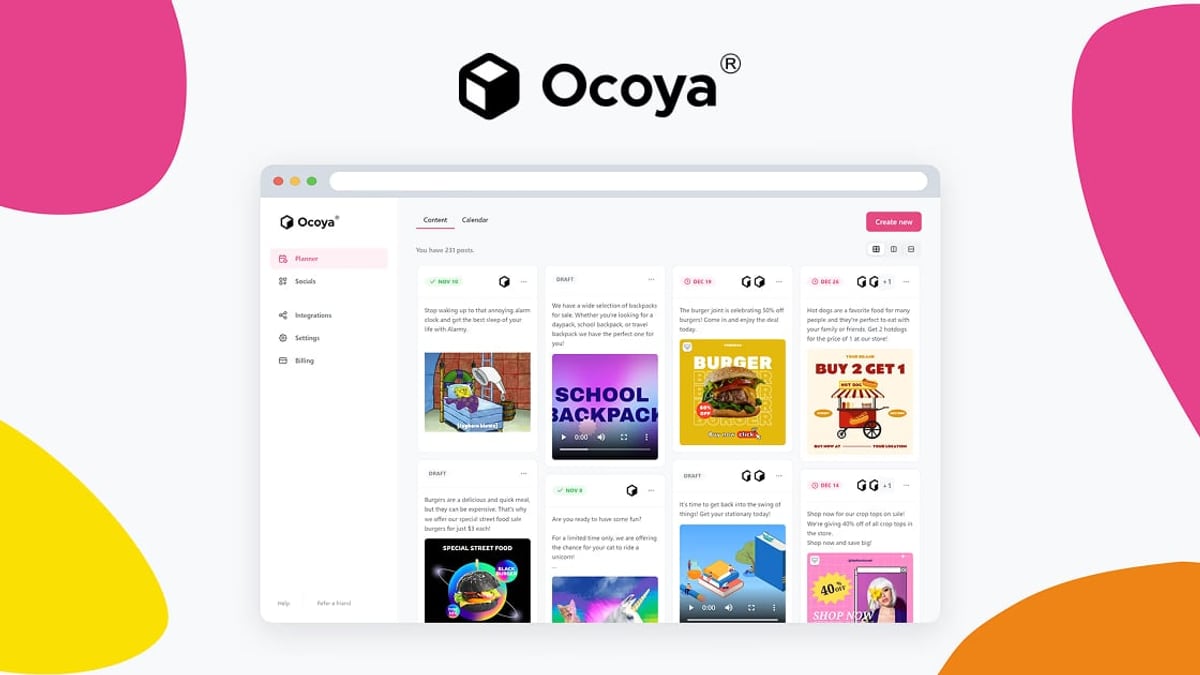
Ocoya Review: Features, Pricing & Honest Verdict (2026) product interface and feature overview.
Ocoya is an AI‑powered social media management hub that aims to collapse design, copywriting, scheduling, and publishing into a single workflow. Instead of jumping between graphic tools, AI writers, and a scheduler, you get a native editor with templates, an AI copywriter that generates captions and hashtags, a drag‑and‑drop content calendar, and direct integrations with Facebook, Instagram, Twitter, LinkedIn, Pinterest, TikTok, Threads, Google Business, YouTube Shorts, Discord, Telegram, Slack, and Canva.
The platform also offers AI automation agents that can auto‑draft posts from RSS feeds or new Shopify products, and a comment‑to‑DM workflow for engagement.
 Ocoya’s dashboard combines content creation, scheduling, and AI assistance in a single interface.
Who Should Use Ocoya (and Who Shouldn’t)

Ocoya Review: Features, Pricing & Honest Verdict (2026) product interface and feature overview.
Ocoya isn’t a one‑size‑fits‑all tool. It’s designed for people who create content at scale and want to stop paying for multiple subscriptions.
Ideal users:
- Solopreneurs & small business owners who juggle marketing alongside everything else and need a single assistant that can write and schedule posts in minutes.
- Freelance social media managers & agencies handling a handful of clients. Ocoya’s workspaces keep brand assets separate and client approval portals cut down back‑and‑forth emails.
- E‑commerce stores that want to turn product listings into social posts automatically — Ocoya plugs into Shopify and WooCommerce.
- Content repurposers who transform blog posts, product links, or short briefs into multi‑channel campaigns.
Not ideal for:
- Large agencies needing complex team permissions, deep analytics, or enterprise compliance — Ocoya’s feature set is more mid‑market focused.
- Teams that already have a mature, specialized stack they love and just want a pure scheduler.
- Users who expect flawless, human‑quality AI output with zero editing. The AI still needs human review.
Key Features & Strengths

Ocoya Review: Features, Pricing & Honest Verdict (2026) product interface and feature overview.
1. Built‑In AI Copywriting & Campaign Generation
Ocoya’s AI copywriter includes marketing frameworks like AIDA and PAS, plus templates for video hooks, product descriptions, and more. The campaign tab can generate a full multi‑day content calendar — images, captions, and hashtags — from a single brief.
2. Native Visual Editor & Canva Sync
You get a drag‑and‑drop design studio with stock assets, licensed music for reels, and animations. If you’re already a Canva user, you can pull your designs directly into Ocoya without leaving the platform.
3. Automation Workflows & AI Triggers
You can set up rules like: “Every time I publish a new blog post (via RSS), draft a social post with a summary and schedule it.” Or “Whenever a new product is added to Shopify, create a promotional post automatically.”
4. Content Calendar & Best‑Time Scheduling
A visual calendar with drag‑and‑drop rescheduling, holiday awareness, and suggested best posting times per profile.
5. Client Approval Portals
Each workspace can generate a public shareable link so clients can review, comment, and approve drafts without messy email threads.
These capabilities often replace three to four separate tools, which is why many users initially explore Ocoya as a cost‑saver.
Limitations & Critical Feedback
No review is honest without the rough edges. Aggregated from user reviews on Trustpilot and Capterra, here are the recurring pain points:
- AI Quality Inconsistency: Some users on Trustpilot claim the AI integration feels shallow — almost like just a planning tool that uploads your content. Others found the generated copy required substantial editing before it was usable.
- Minor Bugs & Stability: Capterra reviewers mention “minor concerns” around occasional slow load times and glitches, especially when handling very large media libraries.
- Learning Curve: While the interface is intuitive, the sheer number of features can overwhelm a first‑time user.
- Support Responsiveness: A few negative reviews cite slow customer support, especially on the lower‑tier plans.
The Trustpilot rating as of early 2025 reflects a mixed picture, so try the free trial before committing to a yearly plan.
Pricing Signals: What You’ll Actually Pay
Ocoya offers tiered plans, and the public pricing is straightforward:
| Plan | Price (Monthly) | Posting Limit / Social Profiles |
|---|---|---|
| Bronze | $15 | 50 posts / 10 profiles |
| Silver | $39 | 150 posts / 20 profiles |
| Gold | $79 | 500 posts / 40 profiles |
| Diamond | $159 | 1,000 posts / 60 profiles |
An enterprise custom plan is available. There’s also a 7‑day free trial to test the platform.
Compared to buying Canva Pro ($15), ChatGPT Plus ($20), and a scheduler like Buffer (~$15–$99) separately, even the Bronze plan can save you money. However, if you need advanced analytics or unlimited client workspaces, you’ll quickly need the Silver plan or higher.
Setup: How to Get Started Without the Overwhelm
- Create a workspace per brand/client. Upload logos, brand colors, and fonts.
- Connect your social profiles — Facebook, Instagram (business), LinkedIn pages, TikTok, X, etc.
- Run a test AI campaign. Go to the Campaign tab, pick a brand kit, describe a promotion, choose tone and audience, and let the AI generate a few days of posts. Review and edit before publishing.
- Set up automations later. Start with manual scheduling until you’re comfortable, then add RSS triggers or e‑commerce integrations.
Ocoya vs Alternatives: Decision Criteria

Ocoya Review: Features, Pricing & Honest Verdict (2026) product interface and feature overview.
If you’re considering Ocoya, you’re likely also looking at these tools:
- Buffer: One of the simplest and most reliable pure schedulers. If all you need is a queue with a clean UI, check our Buffer review. Ocoya adds design and AI, but Buffer wins on simplicity and stability.
- AdaptlyPost: A newer AI‑focused scheduler with an emphasis on automation. Read our AdaptlyPost review for a head‑to‑head comparison.
- SocialEcho / Sprout Social / Hootsuite: For teams needing advanced analytics, social listening, and inbox management, platforms like Sprout Social or Hootsuite (and their modern rivals) may justify the higher price tag. See where Ocoya sits among the top 10 social media management platforms.
Choose Ocoya if:
- You want an all‑in‑one tool that replaces two or three existing subscriptions.
- You manage 1–5 brand profiles and need an AI assistant for bulk content.
- You value visual design capabilities built right into the scheduler.
Look elsewhere if:
- You only need to schedule pre‑written content and already have a design tool you love.
- Your team requires advanced approval workflows, proofing, or CRM‑like client management.
- You’re frustrated by AI that requires significant manual polishing.
Related reading
- SocialEcho vs AdaptlyPost vs Sprinklr: Full Comparison 2026 - Compare SocialEcho, AdaptlyPost, and Sprinklr on features, AI, pricing, and ideal use cases. Discover which social media management tool fits your business in 2026.
- SocialEcho vs Agorapulse: Pricing, AI & Inbox Showdown (2026) - We compare SocialEcho and Agorapulse on per-account pricing, AI-driven inbox, full content generation, TikTok Shop, and more. Which tool wins in 2026?
Sources and further reading
- Ocoya Software Pricing, Alternatives & More 2026 | Capterra - Ocoya Software Pricing, Alternatives & More 2026 | CapterraCapterrahttps://www.capterra.com › OcoyaCapterrahttps://www.capterra.com › Ocoya
- Ocoya Review: The All-in-One AI Marketing Tool - Ocoya helps businesses create, design, schedule, and automate social media content from a single dashboard.
FAQ
Is Ocoya really an AI tool, or just a scheduler?
It is both. The AI agent can generate captions, hashtags, and full campaigns, but the quality varies. Expect to edit the output — it’s a co‑pilot, not an autopilot.
Does Ocoya have a free plan?
No permanent free plan. There’s a 7‑day free trial that gives access to premium features. After that, you’ll need at least the $15/month Bronze tier.
Can I replace my entire marketing stack with Ocoya?
For many solopreneurs and small agencies, yes — you can replace Canva (for standard social graphics), ChatGPT (for copy), and a basic scheduler. However, if you do advanced photo retouching or need deep analytics, you’ll still need specialist tools.
What do real users say?
Reviews are mixed. On Capterra it holds a decent score, but Trustpilot shows a subset of users feeling disappointed by overpromised AI capabilities. Trial it yourself to see if it fits your workflow.
How does Ocoya handle multiple clients?
Workspaces keep brands separate, and client approval portals ease feedback. However, on lower plans you’re limited to fewer social profiles, so check plan limits against your client load.
Conclusion
Ocoya is a genuinely ambitious platform that goes beyond simple scheduling. Its attempt to merge design, AI copywriting, and publishing into one dashboard can slash your monthly tool stack costs — when it works smoothly. However, the execution isn’t flawless yet. AI content often needs a human edit, occasional bugs can frustrate, and some users feel the AI integration is more marketing than substance.
At SocialEcho, we recommend Ocoya for solopreneurs, freelancers, and small e‑commerce brands that want to consolidate tools and are willing to accept a little editing. For larger teams or those who just need a reliable scheduler without the AI bells and whistles, a dedicated tool like Buffer or a full‑stack platform like SocialEcho may be a better fit. Start with the 7‑day free trial, test against real‑world posting needs, and decide if the all‑in‑one promise pays off.