
Sociality.io Review 2026: Pricing, MCP Layer & Real Limits
Sociality.io is an all-in-one social media management platform that pairs a familiar publishing, engagement, and reporting dashboard with an MCP (Model Context Protocol) layer that lets AI agents pull structured social data. This review breaks down what that actually means for agencies, brands, and AI developers, based on verified user feedback, product documentation, and platform evidence.
What Sociality.io Is (and What It Is Not)

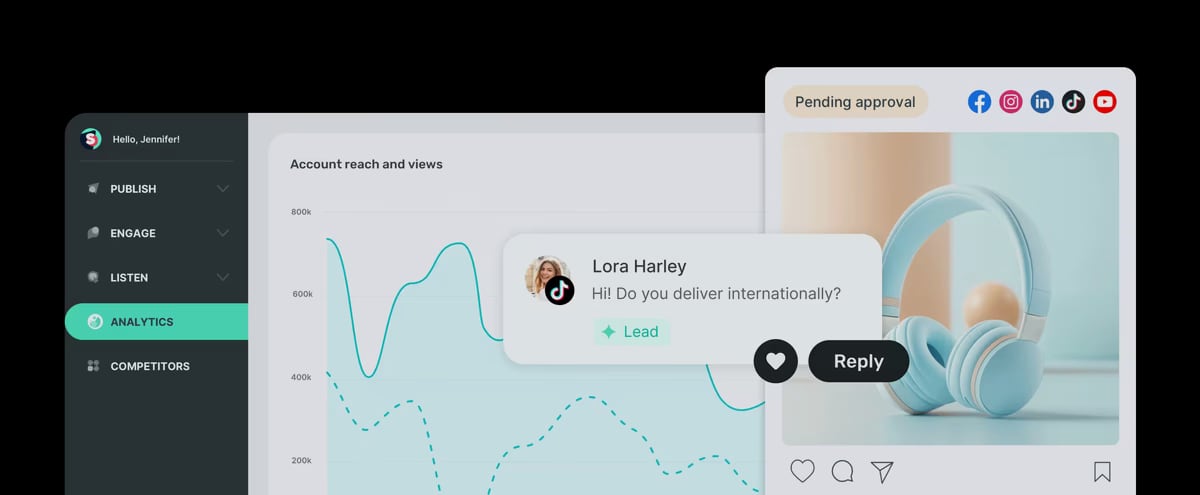
Sociality.io product interface.
Sociality.io covers the core social media management workflow:
- Publishing: Schedule and publish posts across Facebook, Instagram, LinkedIn, TikTok, and YouTube.
- Engagement: A unified inbox for comments, messages, and conversations across connected accounts.
- Listening: Brand mention monitoring across social networks and the web.
- Analytics: Performance reports with detailed metrics per account and post.
- Competitor analysis: Benchmarking against competitor accounts and content.
- MCP layer: A newer interface that exposes social media data to AI agents and tools.
It is not a design tool, a full CRM, or a replacement for a dedicated enterprise social suite. It is a mid-market social operations platform with an unusual AI-access angle.
Who Sociality.io Is Built For

Dashboard + MCP.
Agencies managing multiple client accounts
Sociality.io reports managing over 229 million followers across 12,000 accounts, with global brands like Havas among its users. For agencies, the value is consolidation: publishing, inbox, listening, and reporting in one dashboard rather than four subscriptions.
Brands that need structured social data
The MCP layer is the differentiator. Instead of exporting CSVs and pasting them into a spreadsheet, an AI agent can list accounts, fetch stats, and retrieve competitor insights programmatically. That is useful for:
- Reporting assistants that draft weekly performance summaries
- Benchmarking workflows that compare your accounts to competitors
- Internal copilots that answer questions like "which post drove the most engagement last month?"
AI developers building social data products
If you are building a tool that needs social media insights, the MCP-only plan lets you pay for data access without paying for a dashboard your users will never see. That is a genuinely rare option in this category.
Strengths Backed by Evidence
The unified inbox and monitoring are daily drivers
Verified AppSumo reviewers consistently single out the universal inbox, social reports, and brand monitoring as the features they use every day. One long-term user described the scheduling as simpler than "complicated and bloated" alternatives, and another called the combination of publishing, competitor analysis, mention monitoring, and unified inbox the feature set most other tools leave out.
Navigation is fast and well-organized
G2 reviewers highlight how quick and straightforward it is to schedule and share content across multiple networks. That matters more than feature count for teams that publish daily.
Mobile companion app covers the basics
The iOS app supports publishing, engagement with reply templates, conversation archiving, and activity notifications. It is a companion app for subscribers, not a standalone product, but it keeps approvals and replies moving when you are away from a desk.
The MCP layer is a real strategic bet
Most social media management tools are still bolting AI onto the dashboard as a writing assistant. Sociality.io is exposing the data layer itself. For teams building AI workflows, that is a more durable advantage than a caption generator.
Limitations You Should Know Before Buying
These come directly from verified user reviews and product documentation, not marketing copy.
LinkedIn personal profiles are not supported
This was a deal-breaker for at least one reviewer who expected parity with Buffer. Company pages are supported; personal profiles are not. If your strategy depends on founder-led personal LinkedIn posting, plan around this.
Reporting requires manual date-range selection
Multiple reviewers noted that reports do not open with a default view. You pick a date range and generate. It works, but it adds friction compared to dashboards that show the last seven days automatically.
Publishing is functional, not advanced
Reviewers describe the publishing module as basic. There is no evergreen content recycling, and URL shortener support has been a long-standing request. If you need deep automation rules for content rotation, look elsewhere or pair it with another tool.
Historical onboarding friction
Early AppSumo reviews from 2019 report signup failures and confusion about Instagram direct publishing. The founder responses indicate these were addressed, and later reviews are largely positive, but it is a reminder to test the trial before committing a team to it.
Credit-based pricing requires usage forecasting
Credits are consumed by actions, and the free tier gives you 1,000 one-time credits. That is enough to evaluate, not enough to run a team. You need to model your monthly publishing, listening, and MCP query volume before choosing a plan.
Pricing Signals and Plan Structure
Dashboard + MCP.
Sociality.io uses a credit-based model with two plan shapes:
| Plan type | What you get | Best for |
|---|---|---|
| MCP-only | Structured social data access for AI agents and tools | Developers building copilots or reporting assistants |
| Dashboard + MCP | Full publishing, engagement, listening, reporting, plus MCP access | Agencies and brands running social operations |
A free starting point with 1,000 one-time credits lets you test both the dashboard and the MCP endpoints. Beyond that, cost scales with credit consumption, so the real question is not "what is the sticker price" but "how many actions does my workflow generate per month."
If you are comparing credit-based pricing against flat-rate tools, our SocialEcho vs Planable vs Sprinklr comparison breaks down how different pricing models play out for agencies.
Setup and Onboarding: What to Expect
- Connect accounts. Facebook, Instagram, LinkedIn, TikTok, and YouTube are supported. Confirm which account types (page vs. personal) you need before connecting.
- Set up the inbox. Route comments and messages into the unified view and configure reply templates.
- Configure listening. Define brand keywords and competitor handles for mention monitoring.
- Test reporting. Generate a report for a past date range to see the output format before you promise it to a client.
- Explore the MCP layer. If you are building AI workflows, list accounts and fetch stats early to validate the data shape against your agent's needs.
The onboarding friction reported in older reviews appears resolved, but the platform rewards teams that configure it deliberately rather than connecting everything and hoping.
Sociality.io vs. Alternatives: Decision Criteria

Dashboard + MCP.
Use these questions to decide whether Sociality.io is the right fit:
- Do you need AI agent access to social data? If yes, Sociality.io's MCP layer is a strong differentiator. If no, you are paying for a feature you will not use.
- Do you rely on LinkedIn personal profiles? If yes, this is a hard stop.
- Do you need advanced publishing automation? If you need evergreen recycling or complex rules, evaluate tools built around that first.
- Is your team agency-shaped? Multi-client dashboards, unified inbox, and competitor analysis fit agency workflows well.
- Can you forecast credit usage? If your volume is unpredictable, a flat-rate plan may be easier to budget.
For a broader view of how social platforms differ on AI automation and analytics, see our SocialEcho vs Sprout Social vs Emplifi comparison and SocialEcho vs Hootsuite vs Sprinklr breakdown.
Related reading
- SocialEcho vs Pallyy vs Dash Social: 2026 Comparison - Compare SocialEcho, Pallyy, and Dash Social on AI automation, pricing, scheduling, and analytics. Find the right social media management tool for creators, agencies, and enterprise brands.
- SocialEcho vs AdaptlyPost vs Sprout Social: 2026 Comparison - Compare SocialEcho, AdaptlyPost, and Sprout Social on AI automation, pricing, platform support, and analytics. Find the right social media management tool for your team.
Sources and further reading
- Sociality.io Reviews 2026: Verified Ratings, Pros & Cons | AppSumo - Sociality.io is rated 3.88 out of 5 based on reviews from 17 verified users. Explore helpful comments, compare pros and cons, and find out how Sociality.io works for a business like yours.
- Sociality.io Reviews 2026: Details, Pricing, & Features - G2 - My favorite is how easy and fast it is to navigate the platform. It is super straightforward and well-organized to schedule content, share content on various ...
- Sociality.io App - App Store - Social media management
FAQ
Is Sociality.io good for small businesses?
It can work for small teams, but the credit-based pricing and the breadth of features mean you may pay for capabilities you do not need. Solo creators might be better served by a simpler scheduler. Small agencies with multiple clients get more value.
Does Sociality.io support Instagram direct publishing?
Yes. Instagram is one of the supported networks alongside Facebook, LinkedIn, TikTok, and YouTube. Early reviews raised confusion about this, but the platform now supports it.
What is the MCP layer in Sociality.io?
MCP stands for Model Context Protocol. It is an interface that lets AI agents and tools query social media data directly, such as listing accounts, fetching stats, and retrieving competitor insights. It is designed for building reporting assistants, benchmarking workflows, and internal copilots.
How does Sociality.io pricing work?
Pricing is credit-based. You can choose an MCP-only plan or a Dashboard + MCP plan. There is a free starting tier with 1,000 one-time credits for evaluation.
Can Sociality.io replace my social listening tool?
It includes brand mention monitoring across social and web, and reviewers cite it as a daily driver. For deep sentiment analysis or enterprise-scale listening, you may still want a dedicated tool.
Does Sociality.io have a mobile app?
Yes, there is a free iOS companion app for subscribers that supports publishing, engagement, reply templates, conversation archiving, and notifications. It requires iOS 15.1 or later.
Conclusion
Sociality.io is a credible all-in-one social media management platform with a genuinely differentiated MCP layer. Its strengths are the unified inbox, monitoring, competitor analysis, and the ability to feed structured social data into AI agents. Its limitations are real: no LinkedIn personal profiles, manual report generation, basic publishing automation, and credit-based pricing that demands usage forecasting.
Choose it if you are an agency or brand that wants one dashboard plus an AI-accessible data layer. Skip it if you need advanced publishing automation, personal LinkedIn support, or predictable flat-rate billing. Test the free credits against your actual workflow before you commit, and validate the MCP data shape against your agent's requirements early.